Dispatch a Form Using the API with ReqBin
This topic describes how to use the TrueContext REST API The TrueContext REST API enables developers to update and manage data communicated between TrueContext and their external, third-party systems. Admins can call our API endpoints after they set up an API application and API Key. to dispatch a form with the ReqBin online API testing tool.
To support both new and existing integrations, the TrueContext REST API will continue to use api.prontoforms.com as the base URL.
Available on all tiers:
Contents
Prerequisites
-
Create an API Key
An API Key is used to authenticate calls to the TrueContext REST API. An admin creates the API Key in the TrueContext Web Portal to generate the necessary credentials to connect to the API. (USERS & GROUPS > API Keys... > Create an API Key). Note the API Key ID and the API Key Secret.Note:Copy and securely store your API Key Secret now—this is your only chance to view it. For security reasons, the secret is permanently hidden after you leave this page.
-
You must have a form already configured in the Web Portal.
-
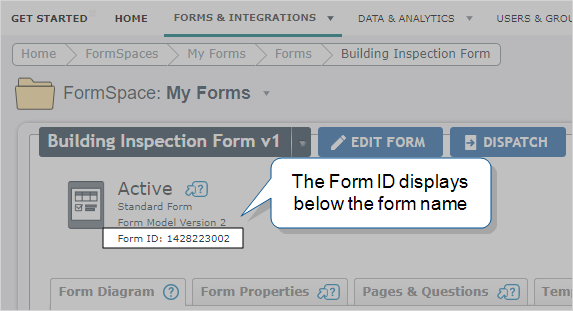
Note the Form ID of the form you want to dispatch.
Select Forms & Integrations > FormName. The Form ID displays in the form details below the form name, as shown in the following example.
-
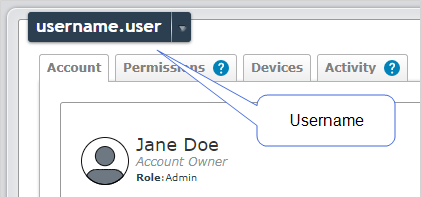
Note the username of the user you want to dispatch the form to.
-
Navigate to the user (USERS & GROUPS > Users... > List Users).
-
Select the user, and locate their username as shown in the following example.
-
-
Note the Unique ID
A Unique ID refers to the specific identifier of a question, form page, form section, or Data Destination. Unique IDs are used as reference points when pulling data for conditional logic, Analytics projects, Data Destinations, and Documents. of the questions you want to prepopulate when you dispatch the form. Navigate to your form, and select the Pages & Questions tab. The Label column lists all of the form’s Unique IDs.
Info:This topic contains full details on how to Create a TrueContext API key.
Steps
-
Go to https://reqbin.com/.
-
In the URL field, enter
https://api.prontoforms.com/api/1.1/data/dispatch.json -
Select
POSTas the HTTP method as shown in the following example.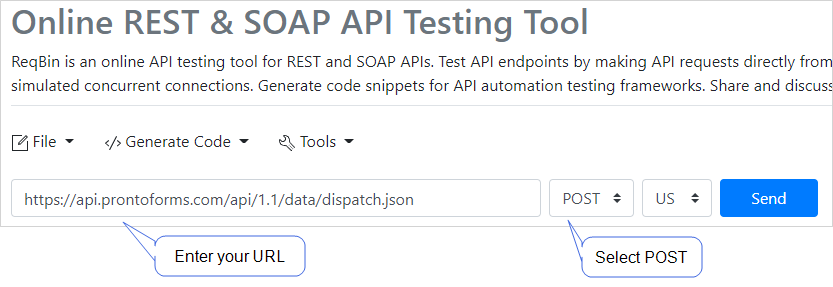
-
Under Authorization, select Basic Auth.
Enter the following:
-
For the Username, enter the API Key ID.
-
For the Password, enter the API Key Secret.
-
-
Under Content, select JSON (application/json).
-
Enter the following Request Body. Enter the Form ID, Username, Unique IDs, and the answers you want to dispatch where needed.
{
  "formId": "{formId}",
  "username": "{username}",
  "data": [
    {
      "label": "{uniqueId1}",
      "answer": "{answer1}"
    },
    {
      "label": "{uniqueId2}",
      "answer": "{answer2}"
    },
    {
      "label": "{uniqueId3}",
      "answer": "{answer3}"
    }
  ]
}
The Request Body might look like the following example.
{ "formId": "149119149", "username": "username.user", "data": [ { "label": "CompanyName", "answer": "ProntoForms" }, { "label": "Email", "answer": "sample@mycompany.com" }, { "label": "PhoneNumber", "answer": "6132229999" } ] } -
Select Send.
Result: You used the API to dispatch a form. The system returns a Response Body similar to the following example.
{
    "dataId": "18188004681",
    "referenceNumber": "20210520-18188004681"
}