Configure Image Stamps in a TrueContext Teamwork-enabled Form
Mobile users can submit incomplete TrueContext Teamwork TrueContext Teamwork is a feature that enables mobile users to transfer incomplete forms for other users to complete as part of a multi-user workflow. This can be useful for jobs that require someone else's expertise or that span multiple shifts.-enabled forms for other users to claim or supervisors to assign Assigning and reassigning control which users are responsible for dispatched records. A dispatcher with the "Can Manage Assignments" FormSpace permission can assign a record to a user or group and reassign it if the original assignee is unavailable. Field users can also claim unassigned records from the Group Inbox.. Different users can submit an incomplete form multiple times until a user sends the completed form. When you configure image stamps on a TrueContext Teamwork-enabled form, you must understand when the system stamps the images. This topic describes the different settings to configure image stamps for TrueContext Teamwork-enabled forms.
Available on the Intelligent and Elite tiers:
When you add an image question to a form, you can configure the question properties to stamp data on the image. Because a TrueContext Teamwork-enabled form can have different submission versions, it can be helpful to understand when the system collects different types of information.
-
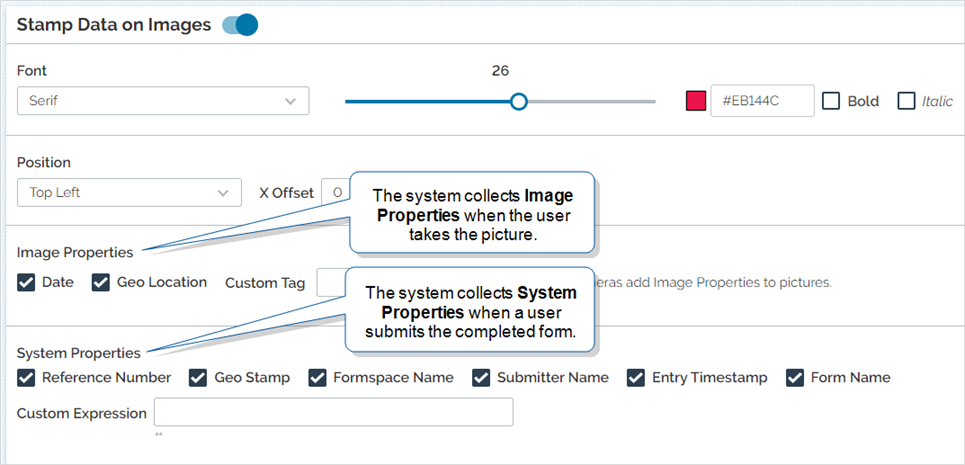
The system collects Image Properties when the mobile user takes the picture. The system only collects Image Properties for images that users upload directly from their camera.
Note:Image Properties depend on the device’s camera settings. Some cameras do not support stamping Image Properties.
-
The system collects System Properties when a user submits the completed form. The system collects the Geo Stamp
Geo Location refers to the capture of location data in a form. A Geo Location question can act as a selector, where the user selects a location on a map, or as a stamp, which automatically captures the device's current location when a form page opens. Location data is classified as Fine (GPS) or Coarse (Network), depending on the accuracy of the source. where the user submits the form, and the Entry Timestamp when the user submits the form.Note:The system does not collect System Properties when a user transfers an incomplete form.
Note:The system stamps images when a user submits the completed form. Even though the system collects information at different times, you can only view the image stamps when the form is complete.
Info:The topic Stamping Data Onto Images describes in detail how to configure an image question to stamp data on images.