Self-Registration Overview
Users can create their own accounts through Self-Registration. An Admin user sets up Self-Registration for their team on the Subscription page. Once activated, self-registered users automatically become members of a specific user group, with access permissions predefined by the Admin user. This topic describes the benefits of Self-Registration and the Self-Registration process.
Tip:This feature is available on request by contacting support@truecontext.com.
Note:The customer is responsible for ensuring all self-registered users are authorized by the customer.
Available on all tiers:
Contents
Benefits of Self-Registration
Some TrueContext customers work with third-party contractors that need access to forms and resources Resources are materials that field technicians can access while they work on records in the Mobile App. A resource might be a Resource Document, like a manual or a floor plan, or a Resource Image, like a schematic or a diagram. Resources are uploaded to a FormSpace and can be referenced in forms or made available in the Resource Library.. Managing access for contractors can create significant work for Admin users due to turnover and technician availability.
With Self-Registration, an Admin user generates a URL where new users can create their own accounts. Contractors can be self-sufficient and enroll their own users.
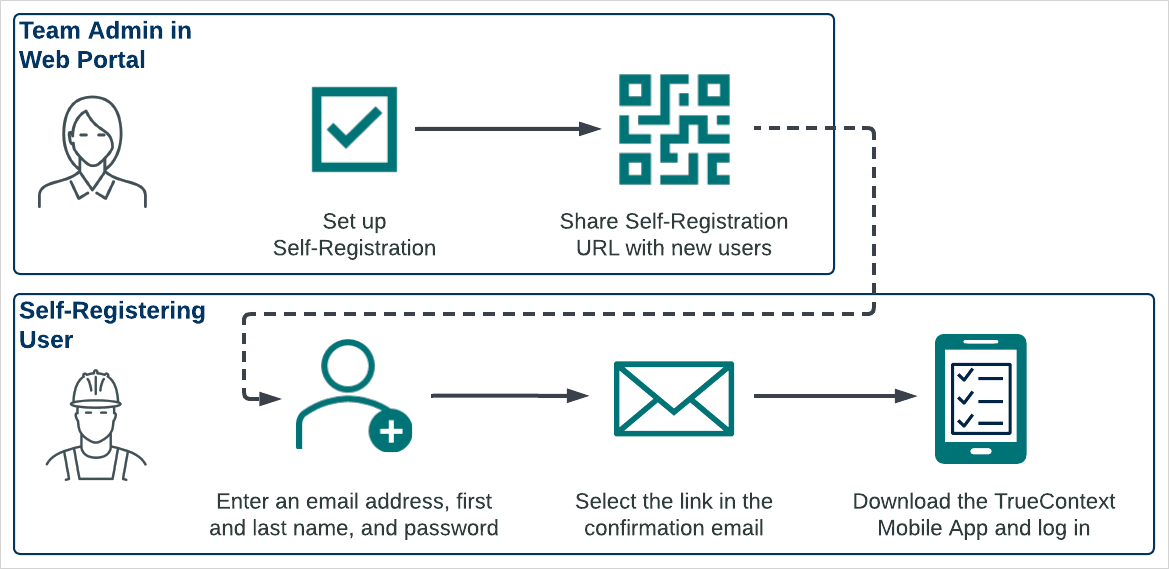
Self-Registration process diagram
The following diagram shows how a user creates their own account with Self-Registration.