What is a Salesforce Data Source?
A Salesforce Data Source Data sources, also known as "Lookups", are external sources of data that you upload or connect to TrueContext. You can reference this data in a form to populate answers or answer options. Data sources save typing, reduce errors, and make it easy to provide mobile users with only the relevant, most current data. is an integration point between Salesforce and TrueContext. The Data Source retrieves data from your Salesforce org and makes that data available in TrueContext.
This topic describes the benefits of using a Salesforce Data Source and lists the different types of Salesforce Data Sources Data sources, also known as "Lookups", are external sources of data that you upload or connect to TrueContext. You can reference this data in a form to populate answers or answer options. Data sources save typing, reduce errors, and make it easy to provide mobile users with only the relevant, most current data..
Available as an add-on for the Intelligent and Elite tiers:
Benefits of a Salesforce Data Source
As with any Data Source, a Salesforce Data Source retrieves data from an external source. The Data Source pulls the record data of any Object type from your Salesforce org. You can use this data to populate the choices in a TrueContext Dropdown, Multiselect, or Radio Button question.
Based on the user’s selection, you can also auto-populate subsequent questions with additional Salesforce data. You can pull this information into a form and keep the form updated when the data in Salesforce changes.
You can configure a Data Source to “fetch” data on a specified schedule. This enables you to maintain and update your data using Salesforce as your system of record without the need to manually fetch the data.
Types of Salesforce Data Sources
Salesforce Report Data Source
A Salesforce Report Data Source pulls data from a Salesforce report into a form.
For example, a Salesforce Case report includes fields such as Case Owner, Account Name, Subject, Status, and Case Number. A Salesforce Report Data Source can populate a form with data from these report fields.
Info:The topic Decide on the Type of Salesforce Data Source provides the required format for Salesforce reports.
Salesforce Query Data Source
How a Salesforce Query Data Source works
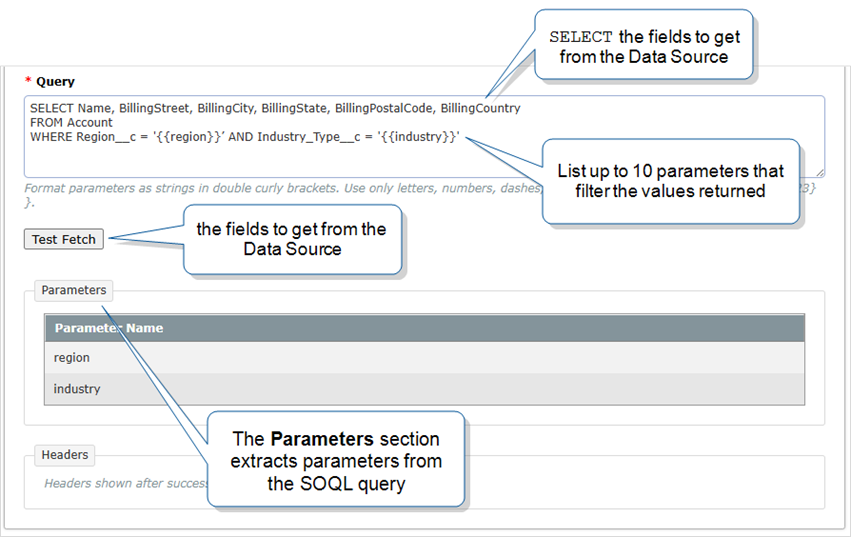
A Salesforce Query Data Source uses the Salesforce Object Query Language (SOQL) to pull data from the Salesforce Standard, Custom, or Big Objects into a form.
For example, the SOQL query SELECT Id, Name FROM Contact enables you to populate a form with IDs and names from the Contact Object.
On-Demand Data Sources
You can set up a Salesforce Query Data Source to retrieve On-Demand data. An On-Demand Data Source An On-Demand Data Source (ODDS) fetches a targeted subset of data from a larger dataset at the moment a field user requests it, instead of storing the data on the TrueContext server. On-demand questions use the values from parameter questions to query the external system, which returns the most up-to-date data. Mobile users must be online to get data from an On-Demand Data Source. queries Salesforce to retrieve live data while a field technician works on a form.
When you set up your SOQL query, enter up to 10 parameters in the Where statement. When a form designer uses an On-Demand Data Source in a form, they link the query parameters to questions. The answers to those questions become filters that complete the query.
Info:The topic Set Up On-Demand Data Sources describes this process in more detail.