On-Demand Data Sources Overview
An On-Demand Data Source is a Data Source Data sources, also known as "Lookups", are external sources of data that you upload or connect to TrueContext. You can reference this data in a form to populate answers or answer options. Data sources save typing, reduce errors, and make it easy to provide mobile users with only the relevant, most current data. that fetches a targeted subset of data from a larger dataset. An On-Demand Data Source An On-Demand Data Source (ODDS) fetches a targeted subset of data from a larger dataset at the moment a field user requests it, instead of storing the data on the TrueContext server. On-demand questions use the values from parameter questions to query the external system, which returns the most up-to-date data. Mobile users must be online to get data from an On-Demand Data Source. fetches data as needed, giving field technicians access to the most up-to-date information while they work. A standard Data Source, by contrast, stores data as a table on the TrueContext server. The Mobile App downloads this stored data during the reconcile process, making it available even if the user is offline.
With an On-Demand Data Source, the Mobile App only gets the information your field technician needs, when they need it, ensuring data freshness. You can also make parts of Data Sources Data sources, also known as "Lookups", are external sources of data that you upload or connect to TrueContext. You can reference this data in a form to populate answers or answer options. Data sources save typing, reduce errors, and make it easy to provide mobile users with only the relevant, most current data. that exceed size limits available using On-Demand Data Sources. This topic explains when to choose the on-demand option and how it works on the TrueContext Mobile App.
Available on the Elite tier:
Contents
Types of On-Demand Data Sources
You can set up the following Data Source types to fetch data on demand:
How On-Demand Data Sources work
An On-Demand Data Source fetches data dynamically based on information provided in a form. When you set up your Data Source, you can define parameters that map to questions in the form. When you set up your form, you select which questions map to those parameters. Then, when mobile users answer the parameter questions A parameter question is any question defined in your form that's also used to provide values to an On-Demand Data Source or a Webhook query., the form fetches the data from your third party.
The following illustration shows how this works with a Salesforce Query On-Demand Data Source.
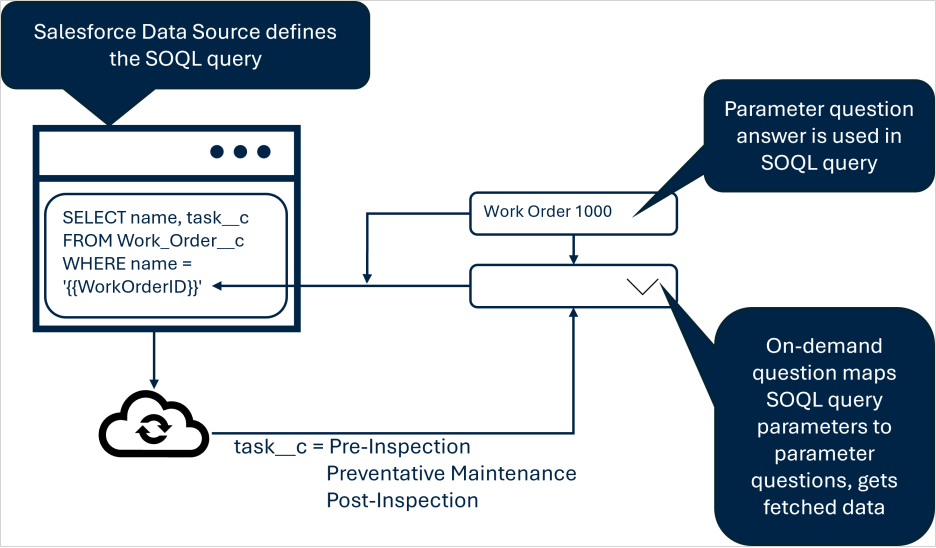
-
The Salesforce Query Data Source defines the SOQL query, including the parameters used to filter the dataset.
-
An on-demand question in the form uses the On-Demand Data Source and maps the SOQL query parameters to the parameter questions.
-
When all of the parameter questions are answered, the on-demand data fetch is triggered.
-
Once the subset of data is fetched, it becomes available in the form.
Tip:You might have only one parameter defined in your SOQL query. For example, you might only need to filter on a unique identifier, such as a Work Order ID.
When a data fetch happens
A data fetch happens when:
-
The last required parameter has been provided.
- The answer to a parameter question A parameter question is any question defined in your form that's also used to provide values to an On-Demand Data Source or a Webhook query. changes. This can happen when a field user changes the answer, or when a conditional logic rule results in a change.
- A field user manually refreshes on-demand data.
- A user opens a:
- Form that was dispatched to the user or group with the parameter questions pre-filled.
- Form saved as a draft on their device where the parameter questions had been answered.
- Form transferred as incomplete that had the parameter questions answered.
- Completed form to edit it.
Note:If the mobile user opens the form while offline, the On-Demand Data Source will fail to fetch.
Note:Each data fetch counts toward your third party API call limits. For Salesforce, check your licensing agreement and keep in mind the load on your Salesforce API across your ecosystem. Make sure that your API limits are enough to meet your demand.
Benefits of on-demand data retrieval
- Works with large datasets: Size limits don’t apply until the subset of data is fetched. On-demand data is limited to 1,000 rows and 10,000 cells. This limit is smaller than our standard size limits because you only fetch the data you need.
- Access to the latest data: Users can access the latest information from your third-party system.
- Privacy: Sensitive information stays in your third-party system unless specifically requested.
Examples of on-demand data
- Dynamic Work Order Lists: Field technicians can get up-to-date work order lists directly from your third-party system using On-Demand Data Sources. This ensures access to the latest job list, especially for frequently changing lists.
- Real-Time Work Order Details: Once a field technician selects a work order, the Mobile App fetches the latest details from your third-party system. This provides crucial, current information for frequently updated work orders.
- Updated list of open issues: When a field technician selects a site name, the On-Demand Data Source fetches an up-to-date list of open issues. This prevents field technicians from working on issues that are already closed.
On-Demand on the Mobile App
Technician experience of an On-Demand Data Source
The field technician experience is almost the same as with Dropdown, Multiselect, and Radio Button questions that get data from a standard Data Source. The differences are:
-
Parameter questions
A parameter question is any question defined in your form that's also used to provide values to an On-Demand Data Source or a Webhook query. provide the values used in the Data Source to filter the data that gets fetched. Once all parameter questions are answered, the data is fetched for the on-demand question An on-demand question is a question in your form that fetches data from an On-Demand Data Source. Similarly to standard Data Sources, these can be Dropdown, Radio Button, and Multiselect questions.. The parameter questions can be answered by dispatching, an App‑to‑App call, conditional logic, or a by a field technician entering the data. -
Because data is retrieved while the user works on a form, the user must be online when the query is triggered. After the data has been fetched, users can continue working offline.
Video example of an On-Demand Data Source
This video shows an example of how an On-Demand Data Source works on the Mobile App.
Note:You can dispatch answers to parameter questions, but not to on-demand questions An on-demand question is a question in your form that fetches data from an On-Demand Data Source. Similarly to standard Data Sources, these can be Dropdown, Radio Button, and Multiselect questions.. For work orders, you could prefill a value by dispatching (including via the TrueContext REST API The TrueContext REST API enables developers to update and manage data communicated between TrueContext and their external, third-party systems. Admins can call our API endpoints after they set up an API application and API Key.), an App‑to‑App call, or conditional logic.
Comparison of On-Demand and other Data Sources
Both standard and On-Demand Data Sources fetch data and can be used to push answers to other questions.
The following table compares the differences between an On-Demand and other Data Sources.
| Characteristic | With On-Demand | Without On-Demand |
|---|---|---|
| Data Freshness | Always provides latest data | Can be refreshed as often as once per hour |
| Connectivity |
Mobile user must be online when filling out the form so that the On-Demand Data Source can fetch the data. |
User can be offline once the dataset is downloaded to the device, before they open the form, during a reconcile. |
| Resource Usage | Lower storage requirements on device | Higher storage requirements on device |
| Sensitive Data |
|
Can be partitioned |
Data fetch behavior and rules
| Type of behavior | Details | ||||||||||||||||
|---|---|---|---|---|---|---|---|---|---|---|---|---|---|---|---|---|---|
| Device connectivity | The user’s device must be online. A reliable network connection is required when data is being fetched. | ||||||||||||||||
| When a data fetch happens |
A data fetch happens when:
Note:Each data fetch counts toward your third party API call limits. For Salesforce, check your licensing agreement and keep in mind the load on your Salesforce API across your ecosystem. Make sure that your API limits are enough to meet your demand. |
||||||||||||||||
| Saving drafts | A draft doesn't store data from the fetch. Fetched data is refreshed when a user opens the draft. | ||||||||||||||||
| Parameter question types |
You can use any of these single-answer question types for parameter questions:
|
||||||||||||||||
| On-demand question An on-demand question is a question in your form that fetches data from an On-Demand Data Source. Similarly to standard Data Sources, these can be Dropdown, Radio Button, and Multiselect questions. types |
Any "lookup" question (same as for any type of Data Source) can use an On-Demand Data Source. For example:
|
||||||||||||||||
| API usage | Each fetch counts as an API call to your third-party system. | ||||||||||||||||
| Request limits |
Five unique fetch requests are allowed per form. The Form Builder limits the number of unique fetch requests that you can set up. A “fetch request” is defined as a unique combination of a Data Source and parameter questions. For example:
|
||||||||||||||||
| Size limits | Queries return up to 1,000 rows and up to 10,000 cells. This limit is set to avoid an impact on device performance, and to keep On-Demand Data Sources limited to the necessary data. | ||||||||||||||||
| Dispatching and App‑to‑App calls |
Dispatching to on-demand questions isn't supported. On-demand questions fetch the data instead. Similarly, sending an answer by App‑to‑App call to an on-demand question is not supported. Tip:You can populate a Work Order ID question and use it as a parameter question. This way, you can get the latest Work Order information using an On-Demand Data Source. |
||||||||||||||||
| Parameter question placement | Parameters must exist in the main form, prior to the on-demand question. Parameter questions are not allowed inside Repeatable Sections. |
Incompatible features with On-Demand Data Sources
Some features don’t work with on-demand data because the data isn’t stored in TrueContext. The following features are not compatible with On-Demand Data Sources:
- Data partitioning
- Download the Data Source as Excel or CSV
- Merge
To ensure that forms linked to On-Demand Data Sources work properly, the following restrictions apply:
-
You can only copy an On-Demand Data Source if the target FormSpace
FormSpaces are where forms are stored and organized in the TrueContext Web Portal. A TrueContext Team may have multiple FormSpaces, depending on their needs. Admins can set FormSpace permissions to control which users have access to the forms in that FormSpace. has access to its associated Connection. -
You can only copy a form linked to an On-Demand Data Source if the target FormSpace has a matching Data Source. A matching Data Source is an On-Demand Data Source with the same name, headers, and parameters.